With more than 20 years of experience - I represent a team of professionals that specializes in the healthcare and business and workflow automation domains. The team consists of experienced full-stack developers supported by senior system analysts who have developed multiple bespoke applications for Healthcare, Business Automation, Retail, IOT, Ed-tech domains for startups and Enterprise Level clients
Remember when hospitals used pagers for updates and lots of handwritten notes to take care of patients? Back then, it worked. But in today’s modern healthcare landscape these traditional methods can pose unique technical and organizational challenges.
Similarly, legacy healthcare applications can’t keep up with the evolving demands of modern healthcare. With digital transformation in full swing, many healthcare organizations have recognized a need to modernize the legacy systems.
Integrating advanced technologies like AI, IoT is not a choice but a necessity. It helps take the technological advancements and meet the changing needs or demands of both the patient and healthcare providers.
In this blog, we will dive deeper into how upgrading legacy healthcare systems can revolutionize patient care, enhance data security, and reshape the operations across the board. Whether you’re a healthcare professional, IT specialist, or simply interested in technology and healthcare, this guide will provide valuable insights about the healthcare software modernization process.
What is a Legacy System in Healthcare?
In healthcare, a legacy system is basically an old software or technology platform that’s still being used, even though there are much better, more advanced options out there. These systems have been in place for years or sometimes decades and are so deeply integrated into daily operations that healthcare organizations hesitate to replace them, despite their growing problems.
While they might still “work,” legacy systems come with their fair share of headaches:
Limited Integration: These systems often can't integrate to newer technologies like AI, IoT or cloud thus result in creating frustrating silos of data that make it harder for healthcare providers to get the full picture of a patient’s care.
Expensive Maintenance: Keeping these systems working efficiently requires constant fixes, costly upgrades, and hardware.
Security Risks: Because they’re no longer updated, legacy systems are vulnerable to cyberattacks. In fact, they’re responsible for a staggering 60% of healthcare data breaches.
Slow Workflows: Healthcare professionals have to perform many tasks manually. This makes processes slower, less efficient that can delay patient care and slow down staff productivity.
Why Are Legacy Systems An Issue for Healthcare Organizations?
Using outdated systems in healthcare creates significant challenges that can’t be ignored. Studies show that outdated technology causes 54% slower operational workflows, directly affecting patient care where every second matters. Security is another major concern. Legacy systems account for 60% of data breaches in healthcare, with an average breach costing $10.93 million. That’s a financial and reputational risk no provider can afford.
Over 70% of healthcare providers still use legacy systems to carry out their core operations. These systems can’t integrate well with modern technologies like telemedicine, AI diagnostics, or real-time analytics.
On top of that, these software systems are also very expensive to keep running over time.Thus they become the financial burden rather than an asset. Up to 15% of IT budgets are spent maintaining these systems instead of investing in modernization.
Patient data is also at risk with the legacy software. These systems demand immediate attention. Although it might seem tempting to avoid upgrading legacy systems, relying on them can cause more harm than good. Investing in modernization will help protect patient data, reducing costs, and stay prepared for the future of healthcare.
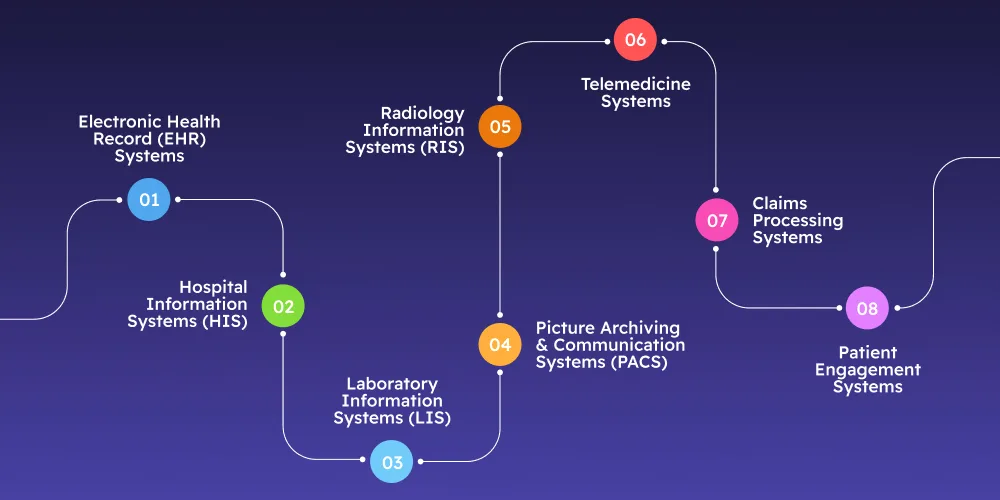
Types of Legacy Healthcare IT Systems
Let’s look at the main types of legacy systems in healthcare and how they impact patient care:
1. Electronic Health Record (EHR) Systems
Outdated EHR systems often have limited features. This makes them harder to use and leads to more time spent navigating the system instead of focusing on patient care.
2. Hospital Information Systems (HIS)
Legacy HIS systems often don’t work well with other hospital systems, making it harder to get real-time information and create reports. This slows things down and can affect hospital efficiency.
3. Laboratory Information Systems (LIS)
LIS systems manage lab data, like test results and samples. Outdated LIS systems don't work well with new technologies, leading to delays in getting important lab results to doctors, which can affect how quickly patients are treated.
4. Picture Archiving and Communication Systems (PACS)
Older PACS systems don’t have enough storage or speed. This makes it tough to get to the images and share them fast. The medical team has to wait. That can slow down the whole process of figuring out what is wrong and what to do next.
5. Radiology Information Systems (RIS)
RIS systems manage radiology appointments, workflows, and billing. Older systems may not automatically schedule appointments or integrate with other hospital systems. This can cause double data entry, errors in billing, and inefficiencies in resource use.
6. Telemedicine Systems
Telemedicine allows doctors to see patients remotely, but older telemedicine systems may not offer the secure or reliable technology needed for today’s virtual healthcare. When these systems are updated doctors and nurses can take care of patients even if they are not in the same place.
7. Claims Processing Systems
Claims processing systems help manage billing between healthcare providers and insurance companies. Legacy systems struggle to keep up with changing billing rules and regulations, leading to delays and mistakes in payments.
8. Patient Engagement Systems
Patient engagement systems help doctors communicate with patients, provide education, and send reminders. Older PES may not be mobile-friendly or integrate with advanced technologies. This leads to poor patient experiences and lower engagement in their care.
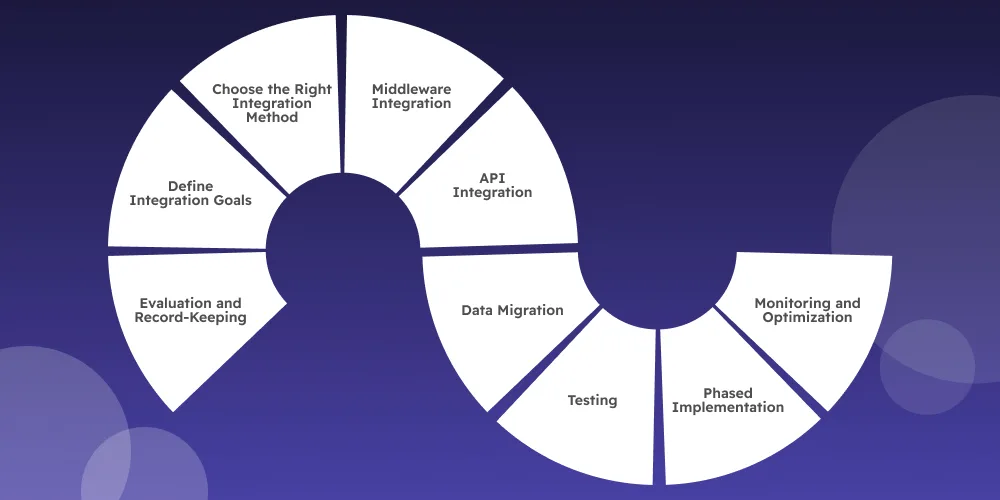
Here’s a step-by-step guide on how to upgrade legacy systems:
1. Evaluation and Record-Keeping
Before the upgrade, the first step is a deep dive into your existing system. It is necessary to understand what works, what doesn’t, and document everything like what integration are needed, data formats, and system dependencies. This will give you a roadmap for making informed decisions during the process.
2. Define Integration Goals
What do you want your updated system to achieve? Whether it’s smoother data flow, better functionality, or compliance with the latest technology, setting clear integration goals is key. Align them with your healthcare organization’s broader business objectives to ensure the upgrade helps you meet your goals.
3. Choose the Right Integration Method
Not all upgrades are the same, and choosing the right strategy is crucial. From simple data migration to complex middleware integrations, you’ll need a solution that fits both your current infrastructure and future needs. Be sure to think long-term—what works today should be scalable tomorrow.
4. Middleware Integration
Middleware can be a lifesaver when it comes to connecting old systems with modern ones. This tool acts as a bridge, allowing data to flow seamlessly between your outdated systems and newer applications without a full-scale replacement.
5. API Integration
Application Programming Interfaces (APIs) are another powerful tool for modernization. With the right APIs, you can integrate old and new systems, providing smoother operations. Don’t forget to prioritize security—always ensure that proper authentication and authorization mechanisms are in place.
6. Data Migration
Data migration is like moving to a new home. It requires careful planning and execution to ensure that all your patient data—accurate and intact—moves from your legacy system to the new one. After the transfer, it’s crucial to verify consistency and accuracy.
7. Testing
Before you roll out the upgrade, software testing is a must. Comprehensive testing will help identify any glitches or faults. Whether it’s user acceptance testing or integration testing, you want to ensure everything works as it should.
8. Phased Implementation
One of the biggest concerns with upgrading is disruption. To minimize this, consider a phased rollout of the new system. Start small, monitor progress, and address any issues along the way. This gradual approach ensures a smoother transition and reduces the risk of operational hiccups.
9. Monitoring and Optimization
The upgrade doesn’t end once the new system is in place. Continuous monitoring helps identify performance bottlenecks, user feedback, and areas for improvement. Ongoing optimization ensures that the system stays aligned with your organization’s evolving needs.
Transform Healthcare with DITS Expertise!
Let us help you modernize your systems and build a future of smarter, connected care.
Get in Touch Today!
Key Approaches to Modernize Your Legacy Healthcare System
Modernizing a healthcare system isn’t a one-size-fits-all approach—it’s more like picking the right tool for the job. Let’s dive into some tried-and-true methods that organizations use to breathe new life into their outdated systems.
Approach
What It Means
When to Use It
Encapsulation
Think of it as wrapping your old system in a shiny new layer, like adding a sleek cover to an old phone. APIs and modern interfaces allow old systems to "talk" to newer ones without heavy modifications.
If your core system works fine but needs better integration with modern apps or tools.
Rehosting
Also known as “Lift and Shift,” this is about moving your system to a new platform, like from physical servers to the cloud—no need to touch the application code.
Ideal if your system performs well but could benefit from modern infrastructure, like cloud scalability or reduced hardware maintenance.
Refactoring
This is cleaning and organizing your system’s code—think of decluttering a closet to make it more functional. It improves performance without changing how the system works externally.
Use this when your codebase feels messy or outdated, making it harder to maintain or scale.
Rebuilding
Starting from scratch! You rewrite the system with modern tech while keeping the functionality and logic your team relies on.
Perfect if your current system is too outdated or expensive to maintain, and you want something new that meets today’s tech demands.
Replacing
This involves completely swapping your legacy system for a modern solution that’s a better fit for your organization’s goals.
Best for systems that are beyond repair or modernization, and where investing in a fresh start makes more sense in the long run.
Rearchitecting
Redesigning how your system is structured, often breaking it into smaller, more manageable parts like microservices to improve scalability and flexibility.
Choose this when your system’s current setup can’t handle modern demands like cloud-based deployments, rapid updates, or the need for high scalability.
Healthcare Software Modernization with AI
Modernizing healthcare software is not just about replacing old systems. It is also about making them smarter with the help of Artificial Intelligence (AI). By adding AI to modern healthcare applications, organizations can improve patient care, reduce manual work, and make faster, more informed decisions.
Here are some ways AI supports healthcare software modernization:
1. Faster Clinical Decisions
AI can quickly analyze large amounts of patient data, medical records, and test results. This helps doctors identify health risks earlier and make faster treatment decisions.
2. Automates Routine Tasks
Healthcare staff spend a lot of time on repetitive tasks like appointment scheduling, medical documentation, billing, and claims processing. AI can automate these activities, allowing healthcare professionals to spend more time with patients.
3. Improves Patient Experience
AI-powered chatbots and virtual assistants can answer common patient questions, schedule appointments, send medication reminders, and provide 24/7 support. This improves patient engagement while reducing the workload for hospital staff.
4. Better Data Analysis
Modern healthcare systems generate huge amounts of data every day. AI helps organize and analyze this information to identify trends, predict patient needs, and support better healthcare planning.
5. Stronger Security and Fraud Detection
AI can monitor healthcare systems in real time to detect unusual activities, identify possible security threats, and reduce the risk of fraud or unauthorized access to sensitive patient data.
6. Supports Predictive Healthcare
AI can identify patients who may be at risk of developing certain conditions based on their medical history and health data. This allows healthcare providers to take preventive action before problems become more serious.
Why AI Matters in Healthcare Modernization
When combined with modern, cloud-based healthcare systems, AI helps organizations move beyond simply replacing outdated software. It enables faster operations, better patient outcomes, improved security, and smarter decision-making. As healthcare continues to evolve, AI is becoming an essential part of building future-ready healthcare software.
Tips for Managing Legacy Systems in Healthcare
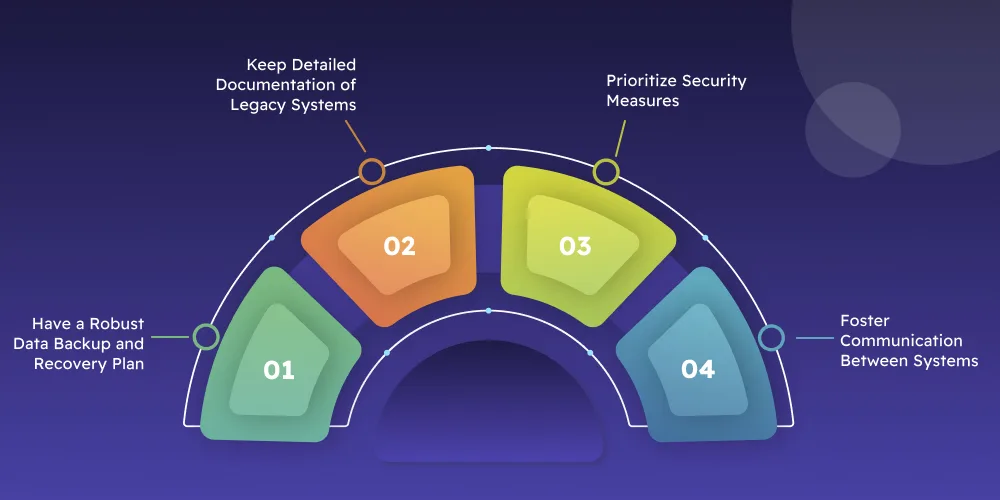
Effectively managing legacy systems is vital, whether you decide to maintain them as they are or modernize them. Here are some practical tips to ensure their smooth operation and security:
1. Have a Robust Data Backup and Recovery Plan
To ensure uninterrupted healthcare services, establish a strong data backup and recovery strategy. Regularly back up sensitive patient information and test the recovery process to confirm it works seamlessly. Using cloud-based backup solutions can enhance both security and accessibility, giving you peace of mind during unexpected incidents.
2. Keep Detailed Documentation of Legacy Systems
Document every detail of your legacy systems, including configurations, processes, and troubleshooting steps. This knowledge repository—comprising user manuals and system guides—will simplify day-to-day operations and make transitions or upgrades much easier. Moreover, it helps train new staff and preserves valuable institutional knowledge when experienced team members leave.
3. Prioritize Security Measures
Protecting patient data is non-negotiable. Regularly update your systems to patch vulnerabilities and strengthen their defenses. Add advanced security measures like encryption and multi-factor authentication, and perform routine security audits to spot and address risks proactively.
4. Foster Communication Between Systems
Integrate your legacy system with other healthcare solutions to build a cohesive ecosystem. This helps healthcare providers to have access to patient information, which improves care delivery.
How Ditstek Innovations Can Help Modernize Your Legacy Healthcare Systems?
Healthcare software modernization is a complex task that demands expertise, planning, time and efforts. At Ditstek Innovations, a leading legacy application modernization company, we excel in transforming outdated applications into secure, scalable, and user-friendly solutions tailored to your organization's unique needs.
Our team specializes in building custom healthcare software solutions designed to meet the specific demands of your business. We ensure seamless integration of cutting-edge technologies such as AI, IoT, telehealth, wearable tech, and more into your existing systems, breathing new life into outdated platforms.
With a proven track record in healthcare software modernization, we’re committed to helping you enhance operational efficiency, improve patient outcomes, and stay ahead in the ever-evolving healthcare landscape.
DITS: Your Partner in Healthcare Modernization!
Innovative solutions to simplify processes and enhance outcomes for your organization.
Absolutely. Older software may not be equipped to handle the security problems we face today. If your software doesn't have the latest encryption or security patches, or if it doesn't follow modern healthcare rules (like HIPAA), it can leave private patient data open to hacking and breaches.
Nidhi Thakur
With more than 20 years of experience - I represent a team of professionals that specializes in the healthcare and business and workflow automation domains. The team consists of experienced full-stack developers supported by senior system analysts who have developed multiple bespoke applications for Healthcare, Business Automation, Retail, IOT, Ed-tech domains for startups and Enterprise Level clients