25+ years of IT software development experience in different domains like Business Automation, Healthcare, Retail, Workflow automation, Transportation and logistics, Compliance, Risk Mitigation, POS, etc. Hands-on experience in dealing with overseas clients and providing them with an apt solution to their business needs.
In the ever-evolving world of mobile technology, understanding the foundation of mobile apps is crucial. At the heart of this is the app stack, it is a collection of technologies and tools that drive the functionality and performance of mobile applications.
In this blog, we’ll dive deep into what app stacks are, how they differ for iOS, Android, and cross platform apps, and why understanding them matters for developers and businesses alike.
What is App Stack?
An app stack is the collection of technologies used to build and run an application. It includes front-end frameworks, backend systems, databases, APIs, and cloud services that work together to deliver the app’s functionality, performance, and scalability. It includes:
Front-End Technologies: These handle everything you see and interact with in the app. They determine how the app looks and feels.
Back-End Technologies: These are the behind-the-scenes elements that manage data, handle user requests, and ensure everything runs smoothly.
Integration and APIs: These allow the app to connect with external services, like maps or payment systems, adding extra functionality and enhancing the user experience.
Understanding the app stack is essential because it influences how well your app performs, scales, and integrates with other systems.
Do I Need to Know About App Stack?
You most definitely do! An app stack is essential for developing any application. It provides the necessary tools and frameworks to build, deploy, and maintain an app efficiently. Whether you're a developer or a business owner, understanding your app stack is vital for optimizing performance, ensuring scalability, and integrating with third-party services.
What Is an App Stack in Mobile Development?
An app stack in mobile development is the set of technologies used to build and run a mobile application. It typically includes programming languages, front-end frameworks, back-end services, databases, APIs, and cloud infrastructure that work together to power an app’s functionality, performance, and scalability.
Example mobile app stacks include:
Android App Stack
iOS App Stack
Programming language: Kotlin or Java Development tool: Android Studio UI framework: Jetpack Compose or XML Database: SQLite or Room Cloud services: Firebase or Google Cloud
Programming language: Swift or Objective-C Development tool: Xcode UI framework: SwiftUI or UIKit Database: Core Data or SQLite Cloud services: iCloud or AWS
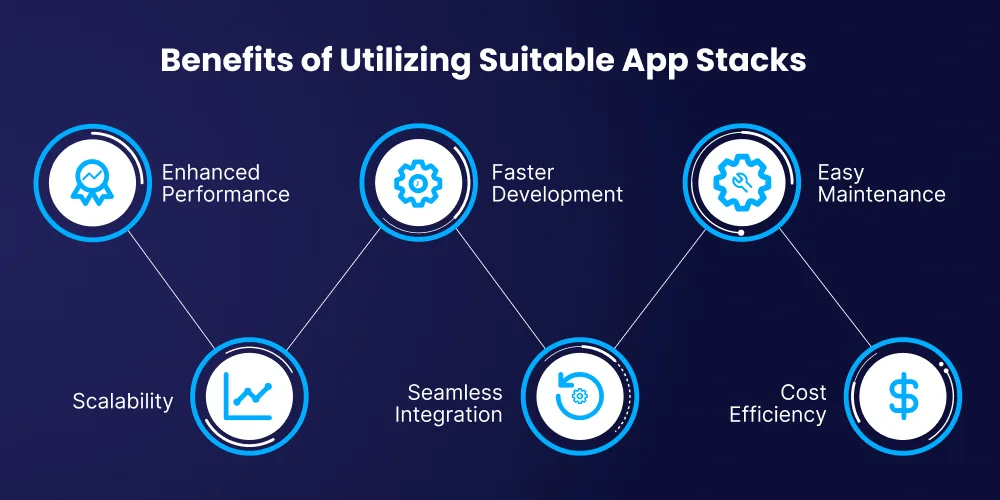
Benefits of Understanding and Utilizing App Stacks
Think of app stacks as the blueprints for building a robust application, if you get it right everything works smoothly and efficiently. Understanding and using app stacks effectively is crucial for creating high-performing and scalable applications that are also efficient and cost-effective.
Let’s explore the key benefits of mastering app stacks with some real-world tech examples:
Enhanced Performance
By choosing the right technologies and keeping them updated, you ensure your app runs smoothly. For example, Facebook uses React Native for its app’s interface and GraphQL for managing data. React Native helps Facebook create a responsive and smooth user interface, while GraphQL optimizes how data is fetched, making the app faster and more efficient.
Scalability
Scalability can be explained as building a structure that can handle more weight as needed. A well-designed app stack lets your application grow and manage more users or data without slowing down.
Take Netflix, for example. It uses a microservices architecture on AWS, which means its app can easily scale up or down based on user demand. This setup ensures that Netflix can deliver high-quality streaming even when millions of users are watching simultaneously.
Improved Integration
A clear understanding of your app stack allows you to connect smoothly with third-party services and APIs; After all, a good integration is like fitting puzzle pieces together perfectly.
Slack is a great example. It integrates with tools like Google Drive and Salesforce, letting users manage their files and customer data directly within Slack. This integration makes workflows more efficient and helps users work more productively.
Faster Development
Using the right tools in your app stack can speed up development, similar to how efficient machinery accelerates production. Shopify shows this well with its use of Ruby on Rails for the backend and React for the frontend.
Ruby on Rails helps developers build features quickly with its built-in tools, while React allows for rapid updates to the user interface. This combination helps Shopify roll out new features and improvements faster.
Better Maintenance
A well-defined app stack simplifies maintenance, making it easier to manage and troubleshoot. Google’s use of Kubernetes for container orchestration is a prime example. Kubernetes helps keep track of application performance and resource use, making it easier for Google’s teams to maintain and update their systems with minimal disruption.
Cost Efficiency
Let’s understand this with the fitting example of Dropbox. It started with Amazon S3 for storage and its own systems for syncing files. As it grew, Dropbox switched to custom-built infrastructure to better control costs and performance.
This change helped Dropbox manage its resources more effectively and reduce expenses. Thus, choosing the right app stack can also save money.
Let our expert App Developers help you
Augment your Business Applications with robust App Stacks for ensured Scalability and Success!
The Android app stack consists of technologies used to build Android applications. It typically includes programming languages like Kotlin or Java, development tools such as Android Studio, UI frameworks like Jetpack Compose or XML layouts, databases like SQLite, and cloud services like Firebase or Google Cloud.
Let’s start by taking a closer look at the app stack on Android phones. Here’s what it typically includes:
1. Front-End Technologies
Android Frameworks: Android apps primarily use Jetpack Compose and XML layouts to build user interfaces. Jetpack Compose is Google's modern declarative UI toolkit, while XML layouts remain widely used for defining screen structures and UI components.
Development Tools: Android Studio is our go-to IDE for Android development. It offers a range of features including a powerful code editor, a layout designer, and an emulator for testing.
2. Back-End Technologies
Backend services for Android apps are commonly built using Node.js, Java, Python, or Go, depending on the application's architecture.
Programming Languages: Android applications are typically developed using Kotlin and Java, the official languages supported by the Android SDK.
Databases: MongoDB, PostgreSQL, MySQL and SQLite are commonly used for local data storage. Room provides an abstraction layer over SQLite, simplifying data operations. WhatsApp, for example, uses SQLite to manage local data efficiently.
3. Integration and APIs
Third-Party APIs: Android apps often integrate with services like Google Maps and Firebase. For example, Airbnb leverages Firebase for real-time data syncing and user authentication.
Cloud Services: Google Cloud offers robust cloud computing services, including storage and machine learning. Spotify, for instance, uses Google Cloud to support its scalable infrastructure and data analytics.
The iOS app stack includes the technologies used to develop applications for Apple devices. It typically involves Swift or Objective-C programming languages, development tools like Xcode, UI frameworks such as SwiftUI or UIKit, databases like Core Data or SQLite, and cloud services like iCloud or Firebase. Here’s a breakdown of what it entails:
1. Front-End Technologies
iOS Frameworks: iOS apps are built using frameworks like SwiftUI and UIKit. SwiftUI is a modern, declarative framework that allows us to design UIs with less code, making it easier to implement complex interfaces.
UIKit, while older, remains powerful and is used for building detailed and interactive UIs. Instagram, for instance, uses UIKit for its user-friendly interface.
Development Tools: Xcode is the primary development environment for iOS. It includes everything from a code editor to an interface builder and a simulator. Snapchat, for example, is developed using Xcode to create its engaging and visually appealing app.
2. Back-End Technologies
Server-Side Languages: Swift and Node.js are popular choices. Swift, originally designed for iOS development, can also be used server-side. Node.js is favored for its scalability and efficiency. LinkedIn uses Node.js for handling high-traffic scenarios and real-time data processing.
Databases: Core Data and SQLite are used for local data management. Core Data offers a higher-level abstraction for data persistence and is utilized by apps like Evernote. SQLite provides a lightweight solution for local storage.
3. Integration and APIs
Third-Party APIs: iOS apps integrate with APIs like Apple Maps and Firebase. For example, Lyft uses Apple Maps for in-app navigation.
Cloud Services: iCloud provides seamless data synchronization across Apple devices. Apps like iWork use iCloud to keep documents synchronized across iPhones, iPads, and Macs.
What is App Stack for Cross-Platform Development?
Cross-platform app development aims to create applications that can run on multiple operating systems using a single codebase. This approach involves a distinct set of technologies and tools designed to maximize efficiency and maintain consistency across different platforms. Let’s break down the key components of a cross-platform app stack:
1. Front-End Technologies
Frameworks: Cross-platform development leverages frameworks such as React Native and Flutter. React Native, developed by Facebook, uses JavaScript and React to build native-like apps for both iOS and Android. For example, Facebook and Instagram use React Native to ensure a consistent user experience across platforms.
Development Tools: Tools like Visual Studio Code and Android Studio are commonly used with these frameworks. Visual Studio Code supports a wide range of plugins for React Native development, while Android Studio provides integrated support for Flutter, offering a seamless development experience.
2. Back-End Technologies
Server-Side Languages: Languages such as JavaScript (Node.js) and Dart (for server-side development with Dart Frog) are popular choices. Node.js, known for its scalability and real-time data handling, is employed by companies like Netflix for its server-side needs.
Databases: Cloud-based databases like Firebase Realtime Database and Firestore are frequently used in cross-platform apps. Firebase Realtime Database provides real-time synchronization and is used by apps like Alibaba’s Xianyu.
3. Integration and APIs
Third-Party APIs: Cross-platform apps integrate with APIs such as Google Maps and various social media APIs. For instance, the Google Maps API is used by apps like Uber for location tracking and navigation across both iOS and Android.
Cloud Services: Platforms like Firebase and AWS Amplify offer backend services, including authentication, storage, and analytics. Firebase Authentication provides a unified user sign-in experience, and AWS Amplify helps in managing app backend services and data synchronization across devices.
By leveraging these technologies, cross-platform development enables us to create apps that are both efficient and consistent across different operating systems, reducing the need for separate development efforts and ensuring a unified user experience.
Common Mobile App Tech Stacks Used by Popular Apps
Many successful apps rely on carefully designed technology stacks to deliver performance and scalability.
Netflix
Backend: Node.js and Java Cloud infrastructure: AWS Data services: Cassandra and MySQL
Instagram
Backend: Python (Django) Infrastructure: AWS Mobile apps: Native iOS and Android technologies
Spotify
Backend: Python and Java Data services: Google Cloud Mobile apps: Native iOS and Android development frameworks
Comparing iOS and Android App Stack with Cross Platform App Stack
To understand the differences among iOS, Android, and cross-platform app stacks, it's helpful to break down each component of the stack and see how they compare. While iOS and Android app stacks are tailored to their respective platforms, cross-platform stacks aim to unify the development process across both environments.
Check out this quick cheat sheet for all the key distinctions between all the app stack and enable yourself to make informed decisions.
What Does App Stack Mean for Businesses Seeking App Development?
Now that you have a solid foundation of how Android app stack , iOS app stack and cross platform app stack differ from each other from a technological standpoint, let’s understand what it means for businesses looking to build apps. Which application should they consider building?
Each kind of application hosts robust tech stacks to deliver an optimal experience for the users. As a business, you want what’s best for your consumers while also being logistically and financially feasible for you. Let’s have a look at the key defining features to consider when looking for app development solutions.
Aspect
Cross-Platform App Development
Native iOS App Development
Native Android App Development
Development Time
Faster due to a unified codebase
Generally fast with consistent OS
Longer due to device fragmentation
Development Cost
Lower overall due to shared resources
Higher due to specialized skills
Lower due to widespread expertise
Performance
Near-native performance
High performance, optimized for iOS
High performance, tailored for Android
User Experience
Consistent across platforms
Superior on iOS devices
Superior on Android devices
Maintenance
Easier with a single codebase
Separate but straightforward
Separate with added complexity
Choosing the Right App Stack for Your iOS/Android Project
Selecting the appropriate app stack for your project is a critical decision that can significantly impact the success of your application. This allows you to select an app stack that not only meets the technical needs of your project but also resonates with your users, ensuring a successful and impactful application.
The choice of stack should be guided by various factors such as the specific needs of the project, desired features, performance requirements, and the preferences of your target audience.
Let’s explore how these considerations influence your choice.
Project Requirements: Understanding your project’s unique needs is the first step in choosing the right stack. Different projects require different features and performance levels. Desired Features: Identify the core functionalities your app needs to deliver and consider any advanced features that might require specialized tools or frameworks.
Performance Requirements: Assess the expected load and performance benchmarks; Accordingly choose technologies known for their efficiency and scalability.
Development Timeline: Determine the project’s timeline and deadlines, then opt for a stack that allows for rapid development and easy iterations.
Target Audience: Your target audience plays a significant role in determining the app stack, as user preferences and behaviors can vary widely between platforms.
Platform Preferences: If your audience predominantly uses iOS devices, prioritize iOS-specific technologies. Conversely, focus on Android-specific technologies if your audience is primarily Android users.
User Demographics: Consider the geographical location and demographics of your users. Adapt your stack choice to cater to the technical preferences and limitations of your target audience.
User Experience: Evaluate the user experience standards of each platform and ensure that the chosen stack supports creating a seamless and intuitive user experience tailored to your audience.
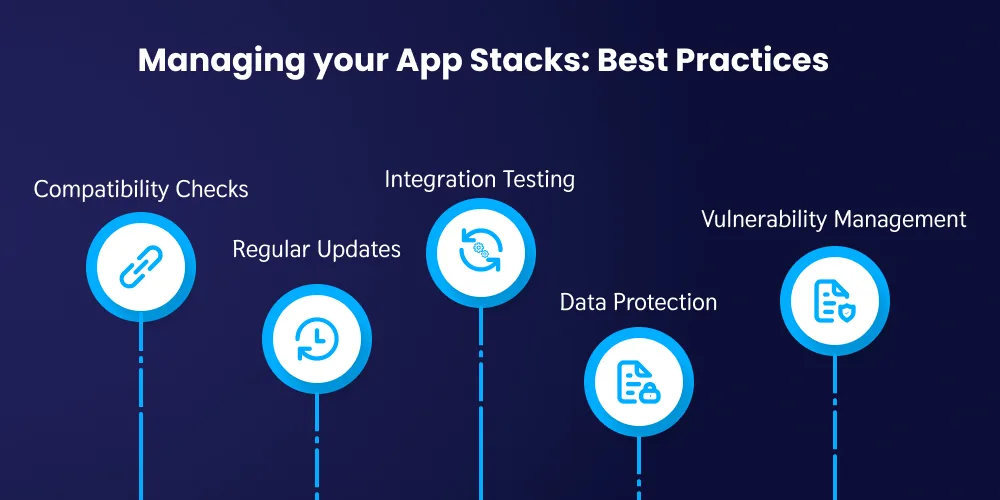
Best Practices for Managing App Stacks
Effectively managing an app stack is crucial for maintaining optimal performance, security, and compatibility. Adopting best practices ensures that your app remains current, functional, and secure throughout its lifecycle. Here are some key practices to follow:
Keep all components of your app stack updated to leverage new features, improvements, and security patches.
Test updates in a staging environment to identify potential issues before deploying them to production.
Conduct thorough integration testing to ensure all parts of the app stack work together seamlessly.
Maintain detailed documentation of your app stack to aid troubleshooting and onboarding new team members.
Implement encryption and other security measures to protect user data, leveraging built-in security features of iOS and Android platforms.
Stay informed about potential vulnerabilities and apply patches promptly to manage risks and keep your apps secure.
Key Takeaways
An app stack is the collection of technologies used to build and operate a mobile application.
Android app stacks typically include Kotlin, Android Studio, Jetpack libraries, and SQLite.
iOS app stacks usually rely on Swift, Xcode, SwiftUI/UIKit, and Core Data.
Cross-platform stacks use frameworks like React Native or Flutter to build apps for both platforms using a single codebase.
Choosing the right stack impacts performance, scalability, development speed, and cost.
Turn Your App Idea Into a Scalable Digital Product
Remarkable App development services for iOS, Android , and Cross Platform Applications for enhanced user experience and responsiveness!
Understanding the app stack is fundamental for building modern mobile applications that are scalable, secure, and high-performing. From front-end frameworks and development tools to backend technologies, APIs, and cloud infrastructure, every component of the app stack plays a crucial role in shaping the performance and functionality of an application.
While Android and iOS app stacks are optimized for their respective ecosystems, cross-platform stacks offer an efficient alternative for businesses looking to build apps for multiple platforms with a unified codebase. The right choice ultimately depends on factors such as performance expectations, target audience, development timeline, and long-term scalability goals.
Here at DITS, we specialize in custom app development services by leveraging robust app stacks tailored to meet the unique needs of each project. Whether you’re targeting iOS, Android, or both through cross-platform solutions, our expertise in selecting and optimizing the best technologies ensures your app is not only high-performing but also secure and scalable.
Let us help you bring your vision to life with cutting-edge solutions that stand out in the competitive market. Talk to us today!
Frequently asked questions
An app stack is a combination of technologies, tools, and frameworks used for building a mobile application. It encompasses everything from the user interface to server-side operations and integration with external services.
Dinesh Thakur
25+ years of IT software development experience in different domains like Business Automation, Healthcare, Retail, Workflow automation, Transportation and logistics, Compliance, Risk Mitigation, POS, etc. Hands-on experience in dealing with overseas clients and providing them with an apt solution to their business needs.