With more than 20 years of experience - I represent a team of professionals that specializes in the healthcare and business and workflow automation domains. The team consists of experienced full-stack developers supported by senior system analysts who have developed multiple bespoke applications for Healthcare, Business Automation, Retail, IOT, Ed-tech domains for startups and Enterprise Level clients
The healthcare industry is changing fast, and managing patient relationships well is more important than ever. Patients expect better care, rules are getting stricter, and hospitals and clinics need to communicate smoothly. This is where Customer Relationship Management (CRM) software comes in.
A good healthcare CRM system helps organizations:
Keep all patient data in one place for easy access and coordination.
Automate appointment bookings, follow-ups, and reminders.
Improve patient communication through calls, emails, and messages.
Stay compliant with rules like HIPAA and GDPR.
Connect smoothly with Electronic Health Records (EHRs), telemedicine platforms, and billing systems.
With the right CRM, healthcare providers can move away from old, slow processes. They can offer better, faster, and more personal care while making their work easier and more efficient.
In the following sections, we will explore the top CRM software solutions for healthcare in 2025, key features to prioritize, and why a custom CRM might be the best fit for specific business requirements.
Why Healthcare Organizations Need CRM Software?
Healthcare organizations handle a lot of patient data, complex workflows, and strict regulations. A CRM system helps them simplify operations, improve patient interactions, and enhance service quality. Here’s why healthcare organizations need CRM software:
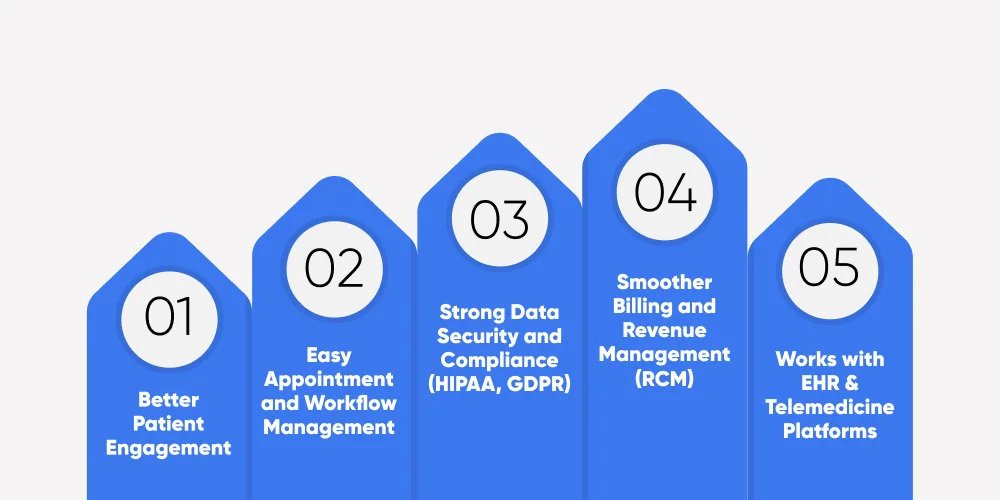
1. Better Patient Engagement
A CRM helps healthcare providers stay connected with patients by keeping track of medical history, preferences, and past interactions. Automated reminders and follow-ups help patients stay informed and proactive about their health.
2. Easy Appointment and Workflow Management
A CRM automates appointment scheduling, cancellations, and follow-ups, reducing manual work. It ensures smooth coordination between doctors, nurses, and administrative staff, making operations more efficient.
3. Strong Data Security and Compliance (HIPAA, GDPR)
Protecting patient data is essential in healthcare. HIPAA and GDPR-compliant CRMs keep information secure with access controls, encryption, and activity tracking.
4. Smoother Billing and Revenue Management (RCM)
A CRM helps simplify billing, insurance claims, and revenue cycle management (RCM) by automating invoicing, tracking payments, and reducing errors, leading to better financial stability.
5. Works with EHR & Telemedicine Platforms
Modern CRMs integrate smoothly with Electronic Health Records (EHRs) and telemedicine software, creating a connected platform for healthcare professionals. This improves care coordination, telehealth services, and remote patient monitoring.
Transform Patient Engagement with the Right CRM!
Whether you're a small clinic or a large hospital, choosing the right CRM solution is key to better patient outcomes and operational efficiency.
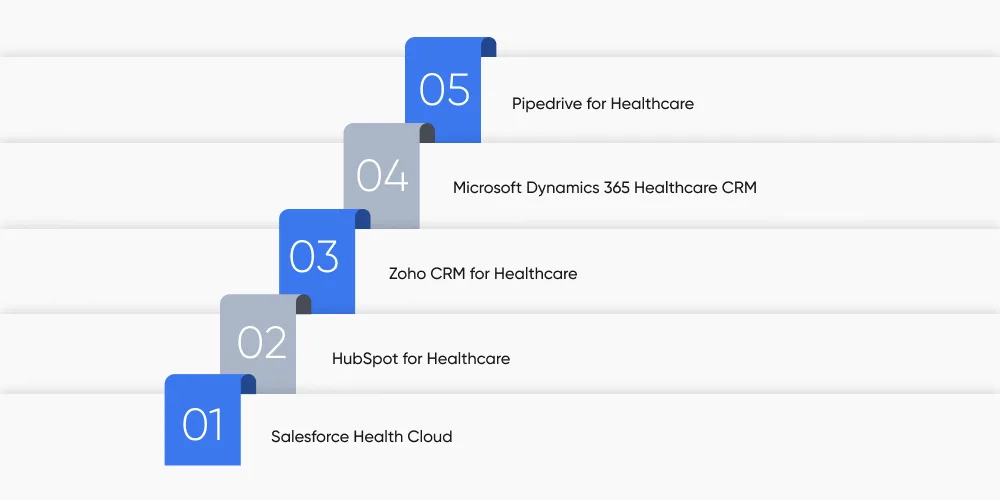
Salesforce Health Cloud is a powerful AI-driven CRM designed specifically for large hospitals, healthcare networks, and multi-specialty clinics. It integrates patient data, EHRs, and predictive analytics into a unified system, helping providers deliver personalized, proactive care.
What sets Salesforce Health Cloud apart is its deep automation capabilities, allowing healthcare organizations to streamline care coordination, patient engagement, and administrative workflows. By leveraging AI-powered insights, providers can improve decision-making, reduce patient wait times, and enhance patient satisfaction.
Health Cloud is built to meet HIPAA and GDPR compliance standards, ensuring data security and privacy. However, due to its enterprise-grade features, it often requires a dedicated IT team for setup and management.
Key Features of Salesforce Health Cloud
360-degree patient view: Centralized data from EHR, medical history, prescriptions, and patient interactions.
AI-powered insights: Predictive analytics for early risk detection and personalized treatment plans.
Automated care coordination: Task automation for referrals, post-discharge follow-ups, and patient engagement.
HIPAA & GDPR compliance: Ensures strict data privacy and security measures.
Multi-channel communication: Connects with email, SMS, live chat, and telehealth platforms.
Integration with EHR & third-party apps: Seamlessly works with Epic, Cerner, and other major healthcare systems.
Pros & Cons of Salesforce Health Cloud
Pros
Cons
Highly customizable and scalable for large healthcare networks
Steep learning curve and requires IT expertise for setup
Seamless EHR and telehealth integration
Custom pricing model, making costs unclear
Strong compliance with HIPAA and GDPR
May require third-party add-ons for additional automation
Pricing
Salesforce Health Cloud follows a custom pricing model, meaning costs vary based on:
Organization size
Number of users
Required integrations & custom features
Estimated Cost: Starts at $300 per user/month for basic features. Advanced AI and automation tools may increase costs significantly.
Free Trial: Available for enterprises upon request.
Get Expert Guidance on Choosing the Right Healthcare CRM!
Not sure which CRM is best for your healthcare business? Let our experts help you compare features, integrations, and compliance standards to make an informed decision.
HubSpot for Healthcare is a user-friendly, marketing-driven CRM designed for small to mid-sized clinics, private practices, and healthcare startups. Unlike enterprise-heavy CRMs like Salesforce, HubSpot focuses on patient management, appointment automation, and marketing automation—helping healthcare providers build long-term relationships with patients.
With intuitive automation tools, HubSpot enables healthcare businesses to manage email campaigns, SMS reminders, telehealth integrations, and patient feedback tracking without technical expertise. It is HIPAA-compliant and provides essential analytics for understanding patient behavior.
What makes HubSpot stand out is its affordable pricing, ease of use, and built-in marketing tools, making it a go-to CRM for small healthcare businesses looking to scale patient engagement.
Key Features of HubSpot for Healthcare
Automated patient outreach: Email and SMS reminders for appointments, follow-ups, and health campaigns.
Marketing automation: Custom email workflows, landing pages, and social media ads for patient retention.
Real-time analytics: Insights into patient engagement, appointment history, and referral tracking.
HIPAA-compliant security: Ensures patient data privacy with strict security protocols.
Easy telehealth integration: Connects with Zoom, Doxy.me, and other telemedicine platforms.
Drag-and-drop workflow automation: Helps reduce manual work and streamline patient interactions.
Pros & Cons of HubSpot for Healthcare
Pros
Cons
User-friendly, requires minimal training
Limited healthcare-specific features compared to Salesforce
Strong marketing automation tools
Lacks deep EHR integration
Cost-effective for small to mid-sized healthcare businesses
Limited AI-driven insights
Built-in telehealth & messaging integrations
Not ideal for large hospital networks
Pricing
HubSpot offers a range of pricing options suitable for different healthcare providers:
Professional Plan ($800/month) – Advanced marketing automation, custom reports, and telehealth integrations.
Enterprise Plan ($3,200/month) – AI-driven analytics, team collaboration tools, and multi-location management.
Free Version Available – Limited features, but great for testing patient engagement tools before committing.
3. Zoho CRM for Healthcare
Zoho CRM for Healthcare is a cost-effective and highly customizable solution designed for small to mid-sized healthcare providers, clinics, and telehealth businesses. Unlike feature-heavy enterprise CRMs, Zoho focuses on simplicity, affordability, and easy automation to help healthcare teams manage appointments, patient records, and engagement workflows efficiently.
Its standout feature is its workflow automation, which reduces administrative burden by automating follow-ups, scheduling, and patient record updates. It also supports multi-channel communication (email, SMS, chat) to improve patient interactions. With a mobile-friendly interface, healthcare professionals can access patient details and appointments on the go.
Zoho CRM is also HIPAA-compliant, ensuring secure patient data storage, which makes it a trusted choice for private practices and mid-sized healthcare centers looking for a reliable yet affordable CRM solution.
Key Features of Zoho CRM for Healthcare
Automated Patient Scheduling: Reduces manual efforts in managing appointments and follow-ups.
Customizable Workflows: Adapt CRM functionalities to match the unique needs of healthcare providers.
Multi-Channel Patient Engagement: Communicate via email, SMS, chat, and phone from a single platform.
HIPAA-Compliant Data Security: Ensures encrypted storage and controlled access to patient records.
AI-Powered Insights: Uses predictive analytics for patient behavior trends and reporting.
Seamless Integrations: Connects with Google Workspace, Office 365, and telehealth solutions.
Pros & Cons of Zoho CRM for Healthcare
Pros
Cons
Affordable pricing for small and mid-sized providers
Lacks deep AI-driven automation like Salesforce
Highly customizable for different healthcare workflows
Basic plans lack advanced reporting features
Mobile-friendly app for on-the-go patient management
Some EHR integrations require third-party add-ons
Multi-channel patient communication tools
Customer support response can be slow on lower-tier plans
Pricing
Zoho CRM offers flexible pricing, making it one of the most affordable CRMs for healthcare businesses:
Standard Plan ($14/month per user) – Essential CRM functions, appointment tracking, and basic reporting.
Professional Plan ($23/month per user) – Adds workflow automation, email templates, and analytics.
Enterprise Plan ($40/month per user) – Includes advanced customization, AI insights, and patient journey tracking.
Ultimate Plan ($52/month per user) – Full access to predictive analytics, automation, and advanced reporting tools.
Free Trial Available – 15-day trial with access to premium features before committing.
4. Microsoft Dynamics 365 Healthcare CRM
Microsoft Dynamics 365 Healthcare CRM is a powerful enterprise-grade solution designed for large hospitals, multi-location healthcare systems, and insurance providers. Unlike small-scale CRMs, Dynamics 365 is deeply integrated with Microsoft's ecosystem, making it an excellent choice for organizations that rely on Microsoft Teams, Outlook, and Azure for cloud infrastructure.
One of its biggest advantages is its AI-powered predictive analytics, which helps healthcare providers identify patient risks, optimize treatment plans, and automate follow-ups. It also excels in claims management, making it ideal for healthcare networks dealing with insurance processing and revenue cycle management (RCM).
With strong HIPAA compliance, multi-location management, and seamless integration with EHR systems, Microsoft Dynamics 365 is a scalable, data-driven CRM for large healthcare organizations looking for predictive automation and deep analytics.
Key Features of Microsoft Dynamics 365 Healthcare CRM
AI-Driven Patient Insights: Uses predictive analytics to assess patient risks and recommend proactive care.
Seamless Microsoft Integration: Connects with Teams, Outlook, Power BI, and Microsoft Cloud for centralized operations.
Multi-Location Management: Designed for large healthcare networks with multiple facilities.
Patient 360 Dashboard: Provides a single view of patient history, appointments, and communication.
HIPAA-Compliant Security: Ensures secure access to patient records and controlled user permissions.
Pros & Cons of Microsoft Dynamics 365 Healthcare CRM
Pros
Cons
AI-powered analytics improve predictive care and patient engagement
Complex setup—requires IT expertise
Deep integration with Microsoft tools and cloud services
Expensive for small healthcare providers
Scalable for large hospitals, multi-location healthcare systems
Steep learning curve for non-Microsoft users
Strong automation for claims and revenue cycle management
Customization can be time-consuming
Pricing
Microsoft Dynamics 365 Healthcare CRM follows a custom pricing model based on business size, integrations, and features required.
Customer Insights Plan ($1,500/month) – AI-powered patient analytics and care coordination.
Enterprise Plan ($3,000/month) – Full suite including claims processing, predictive risk scoring, and EHR integration.
Custom Pricing Available – For large-scale hospitals and enterprise networks needing tailored solutions.
Free Trial – Available upon request for healthcare organizations evaluating scalability.
5. Pipedrive for Healthcare
Pipedrive is a lightweight, easy-to-use CRM designed for small clinics, private practices, and independent healthcare providers who need a simple, visual way to manage patient interactions. Unlike feature-heavy CRMs like Salesforce and Microsoft Dynamics, Pipedrive prioritizes ease of use, automation, and pipeline-based tracking to help healthcare professionals streamline their patient follow-ups, appointment scheduling, and communication.
One of its biggest advantages is its visual pipeline system, which allows healthcare providers to track patient interactions, upcoming consultations, and follow-ups at a glance. It also offers automated appointment reminders, email tracking, and a mobile-friendly interface, making it a great choice for busy practitioners who need a no-frills CRM that just works.
While it lacks deep AI-driven analytics and EHR integrations, it makes up for it with affordability, simplicity, and fast implementation, making it ideal for small healthcare businesses that don’t require enterprise-level complexity.
Automated Reminders: Sends appointment confirmations and reminders via SMS or email.
Customizable Patient Records: Keep track of medical history, interactions, and notes.
Task & Workflow Automation: Reduces manual work by automating administrative tasks.
Multi-Platform Access: Works on desktop, mobile apps, and tablets for seamless patient management.
Affordable & Easy Setup: Quick onboarding with minimal training required.
Pros & Cons of Pipedrive for Healthcare
Pros
Cons
Intuitive drag-and-drop patient pipeline tracking
Lacks deep AI insights & predictive analytics
Affordable pricing, great for small healthcare providers
No built-in EHR or telemedicine integrations
Easy to use with minimal setup required
Limited advanced reporting and automation
Mobile-friendly, accessible on multiple devices
Not suitable for large hospitals or multi-location providers
Pricing
Pipedrive follows a simple and transparent pricing model, making it accessible for small healthcare businesses:
Essential Plan ($12.50/month per user) – Basic CRM with pipeline tracking, email notifications, and task management.
Advanced Plan ($24.90/month per user) – Adds workflow automation, custom fields, and email tracking.
Professional Plan ($49.90/month per user) – Includes team collaboration tools, AI-powered recommendations, and advanced reporting.
Enterprise Plan ($99/month per user) – Full suite with unlimited automation, priority support, and custom security settings.
Free Trial Available – 14-day trial to test features before committing.
How to Choose the Best CRM for Your Healthcare Organization?
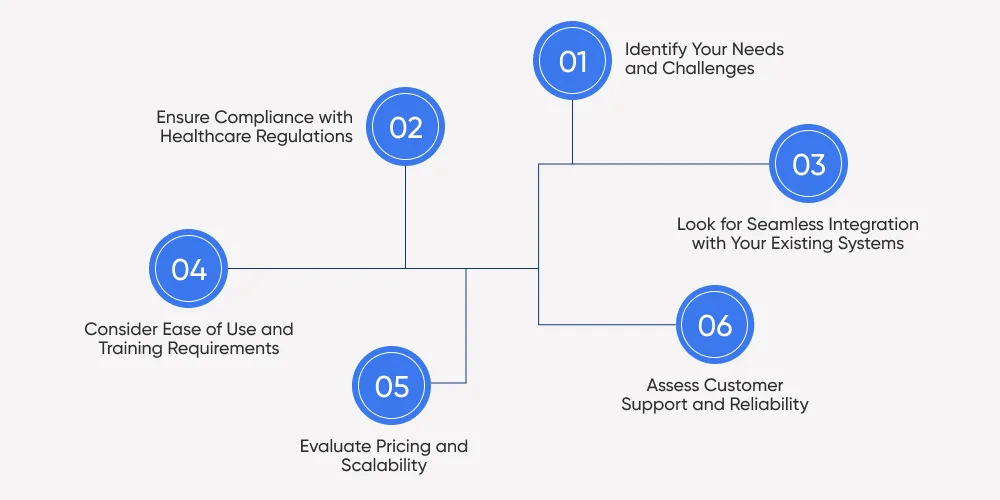
Choosing the right CRM for a healthcare business depends on several factors. Not every CRM fits every type of provider, so it’s important to assess specific needs before making a decision. Below are key points to consider when selecting a healthcare CRM.
1. Identify Your Needs and Challenges
Before selecting a CRM, list the challenges your healthcare organization faces. Do you need a system to manage patient relationships more effectively? Are you looking for a tool to automate appointment scheduling and reduce administrative work? Understanding these needs helps in choosing a CRM that aligns with your goals.
2. Ensure Compliance with Healthcare Regulations
Security and privacy are non-negotiable in healthcare. A CRM must comply with regulations like HIPAA (in the U.S.), GDPR (in Europe), and other data protection laws. Look for a system with strong encryption, role-based access controls, and audit tracking to ensure compliance.
3. Look for Seamless Integration with Your Existing Systems
Most healthcare providers already use Electronic Health Records (EHRs), billing systems, and telemedicine platforms. A good CRM should integrate smoothly with these tools to avoid duplication of efforts and manual data entry.
4. Consider Ease of Use and Training Requirements
A CRM should simplify work, not add to the burden. Some systems come with steep learning curves, requiring dedicated IT support and extensive training. Others are more intuitive and can be set up quickly. If your team isn't highly tech-savvy, opt for a CRM with a simple interface and built-in automation.
5. Evaluate Pricing and Scalability
If you're a small clinic or solo practitioner, a budget-friendly CRM like Zoho CRM or Pipedrive may be enough.
Mid-sized healthcare businesses may need a more advanced CRM like HubSpot, which balances automation and affordability.
Large hospitals and enterprise networks should look at Salesforce Health Cloud or Microsoft Dynamics 365, which offer AI-powered insights and large-scale automation.
6. Assess Customer Support and Reliability
A reliable CRM provider should offer 24/7 support, regular software updates, and a strong knowledge base. Some platforms provide dedicated account managers for enterprise clients, while others offer only email or live chat support. If your healthcare practice requires high uptime and immediate assistance, choose a CRM with a proven support system.
Why Choose a Custom Healthcare CRM?
Off-the-shelf CRMs work for many healthcare providers, but they often come with limitations. A custom CRM is built specifically for a healthcare organization's needs, offering greater flexibility, deeper integration, and enhanced security.
One key advantage of a custom CRM is seamless integration with existing EHR systems, billing platforms, and telemedicine tools. This eliminates manual data entry and improves workflow efficiency. Custom healthcare software solutions also allow tailored automation, ensuring that appointment scheduling, follow-ups, and patient engagement align with the organization’s processes.
Security is another major factor. A custom CRM can be built with HIPAA-compliant security tailored to specific data protection policies. Additionally, as healthcare businesses grow, a custom CRM can scale without licensing restrictions or third-party dependencies.
While custom healthcare software development requires an initial investment, it provides long-term cost savings and operational efficiency for healthcare providers that need specialized features and complete control over their data.
Custom Healthcare CRM Built for Your Needs!
A custom-built healthcare CRM ensures seamless integration with EHRs, telemedicine platforms, and billing systems while meeting strict compliance standards.
DITS develops custom CRM solutions for healthcare providers, ensuring they meet specific workflows, security standards, and integration needs. Unlike off-the-shelf options, a custom CRM is built for your organization, improving efficiency and compliance while eliminating unnecessary features.
How We Deliver Value
Tailored to Your Needs – We design CRM systems that align with your appointment scheduling, patient tracking, and billing processes.
Effortless Integration – Our solutions connect smoothly with EHR platforms, telemedicine software, and financial management tools.
Smarter Automation – Repetitive tasks like follow-ups, appointment reminders, and claims processing are handled automatically.
Regulatory Compliance – We ensure HIPAA, GDPR, and other data protection requirements are met for secure patient information management.
Scalable & Flexible – Our CRMs adapt to growing patient volumes and operational expansion without third-party limitations.
Frequently asked questions
A healthcare CRM is a patient relationship management tool that helps providers organize patient records, automate appointment scheduling, track interactions, and improve engagement. It ensures seamless communication, streamlines administrative tasks, and integrates with EHR and billing systems.
Nidhi Thakur
With more than 20 years of experience - I represent a team of professionals that specializes in the healthcare and business and workflow automation domains. The team consists of experienced full-stack developers supported by senior system analysts who have developed multiple bespoke applications for Healthcare, Business Automation, Retail, IOT, Ed-tech domains for startups and Enterprise Level clients