25+ years of IT software development experience in different domains like Business Automation, Healthcare, Retail, Workflow automation, Transportation and logistics, Compliance, Risk Mitigation, POS, etc. Hands-on experience in dealing with overseas clients and providing them with an apt solution to their business needs.
TL; DR
Outdated legacy systems can increase security exposure because they often lack current patches, modern access controls, and advanced monitoring.
Compliance becomes harder when the system cannot support proper audit trails, encryption, and data retention.
Modernization helps reduce these risks by improving security architecture, data governance, integration, and compliance controls.
The major goal is not to replace the existing system, but to modernize the system based on business needs, criticality, and long-term needs.
Many organizations still depend on applications built on older programming languages, databases, architectures, and infrastructure because these systems continue to support critical business processes. The dilemma arises when the technology reaches end-of-life, loses vendor support, or becomes difficult to patch and monitor.
The growing importance of vulnerability management is reflected in recent breach data. Verizon’s 2026 Data Breach Investigations Report found that vulnerability exploitation accounted for 31% of breaches and was the leading initial access vector in the report’s dataset.
For organizations operating outdated legacy systems, the major debate revolves around more than keeping old software running. As systems age, maintaining consistent security controls, data safeguards, visibility and compliance processes can become progressively tough. This is where modernization provides an opportunity to turn down these risks while creating a more resilient technology environment.
How Outdated Legacy Systems Create Security and Compliance Risks
Outdated legacy systems can introduce security weaknesses that become harder to address over time. These issues can affect the broader IT environment, not just the application. Here are the key reasons outdated systems create security concerns.
Unsupported Software and Missing Security Patches
Once an operating system, database, framework, or application reaches end-of-life, vendor support and security updates may become limited or stop entirely. Newly discovered vulnerabilities can then remain unpatched, increasing security exposure and making it harder to maintain modern security standards.
Outdated Authentication and Access Controls
Older applications often rely on passwords and may not support MFA (multi-factor authentication), modern identity providers, or detailed role-based access controls. This can complicate access limits and protect sensitive accounts.
Limited Visibility Into Security Threats
A security team cannot respond effectively to activity it cannot see. Some legacy systems provide limited event logging or cannot easily connect with modern security monitoring tools, making unusual logins, unauthorized changes, and suspicious activity harder to investigate. Limited logging can also make it harder to produce the evidence required during security and compliance reviews.
Legacy Integrations Increase the Attack Surface
Legacy systems often depend on older APIs, custom connectors, and outdated communication protocols to exchange data with modern platforms. If these connections are difficult to update or monitor, they can increase the organization’s overall security exposure.
Warning Signs Your Legacy System Has Become a Security Risk
A legacy system may continue to function while becoming increasingly difficult to secure, maintain, and improve. Over time, outdated legacy systems can begin to affect business performance and technology decisions. As a result, IT leaders and product owners need to recognize the warning signs early. These often appear through unsupported components, weaker controls, integration challenges, and growing maintenance demands. In particular, watch for these indicators:
No Security Patches: Updates and vulnerability fixes are no longer available, leaving known security weaknesses unresolved.
No Vendor Support: The original vendor has ended support, making technical issues and security problems harder to resolve.
No MFA Support: The system cannot easily support multi-factor authentication or modern identity controls.
Limited Visibility: Security teams cannot easily monitor logins, system activity, unusual behavior, or potential threats.
Manual Compliance: Audit evidence and compliance reports require significant manual effort because the system lacks automated logging or reporting.
Weak Encryption: Sensitive information is stored or transferred without consistent modern encryption controls.
Old Integrations: Connections depend on outdated APIs, protocols, or custom interfaces that are difficult to secure and maintain.
Knowledge Gaps: Only a small number of employees understand how the system works, creating operational and maintenance risks.
Repeat Audit Issues: Security assessments continue to identify the same vulnerabilities or control gaps because the underlying system cannot easily be improved.
How to Modernize Outdated Legacy Systems Without Creating New Risks
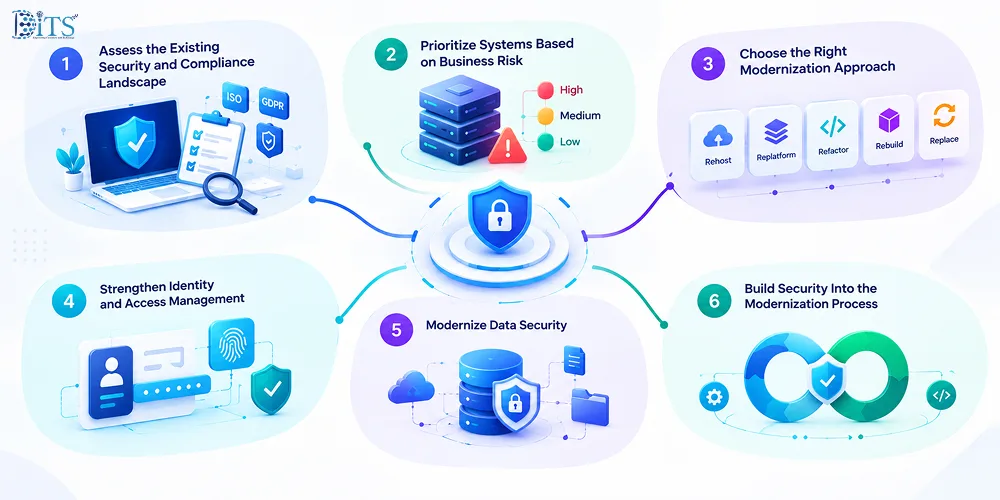
Understanding how to modernize outdated systems starts with reducing risk before changing technology. A rushed migration can introduce new security gaps, break dependencies, or disrupt critical workflows. The safer approach is to understand the current environment, prioritize business impact, and build security into every stage of modernization.
Assess the Existing Security and Compliance Landscape
Start by mapping the application, infrastructure, data, integrations, dependencies, and regulatory requirements around each legacy system. Identify known vulnerabilities, unsupported components, sensitive data flows, and controls that cannot meet current security expectations. This creates a clear baseline for deciding what needs to change and what must remain protected during migration.
Assess Your Legacy System
Identify security, compliance, and modernization risks before they become costly problems.
Not every legacy application needs to be modernized at the same time. Prioritize systems based on security exposure, compliance requirements, business criticality, technical complexity, and the impact of downtime.
Choose the Right Modernization Approach
The modernisation path for an outdated legacy system should match the condition and strategic value of the application. The right choice depends on risk, cost, dependencies, future requirements, and how critical the system is to the business.
Rehosting: Move the existing application to a new infrastructure, such as the cloud, with minimal changes to its code. It is often used when organizations need a relatively quick infrastructure upgrade.
Replatforming: Move the application while making selected improvements to its underlying platform, database, or infrastructure without significantly changing its core architecture.
Refactoring: Modify and restructure parts of the existing code to improve security, performance, scalability, or maintainability while preserving the application's core functionality.
Rebuilding: Develop the application again using modern technologies and architecture while retaining the business capabilities the organization still needs.
Replacing: Retire the legacy application and adopt a different solution, such as a commercial or SaaS platform, when maintaining or rebuilding the existing system provides limited long-term value.
Plan Your Legacy Modernization
Explore the right modernization approach for your business, from rehosting to rebuilding.
Modernization is an opportunity to replace weak or fragmented access controls with stronger identity management. This can include multi-factor authentication, single sign-on, role-based access control, and least-privilege policies that limit users to the access they actually need. Access rules should also be reviewed regularly so outdated accounts and unnecessary permissions do not carry over into the new environment.
Modernize Data Security
To modernize outdated legacy system, identify where sensitive data is stored, how it moves between systems, and who can access it before migration begins. Modern environments should support encryption in transit and at rest, secure APIs, data classification, controlled access, and tested backup and recovery processes. This also helps prevent modernization from simply moving old data-security problems onto newer infrastructure.
Build Security Into the Modernization Process
Security should be part of design, development, testing, deployment, and ongoing operations rather than a final review before launch. NIST’s Secure Software Development Framework recommends integrating secure development practices into the software development lifecycle to reduce vulnerabilities and address their root causes. Automated security testing, vulnerability scanning, dependency checks, and continuous monitoring can help identify issues earlier and reduce the risk of introducing new weaknesses during modernization.
Legacy Modernization vs. Maintaining the Existing System
Keeping an outdated legacy system may appear less disruptive in the short term, especially when it still supports important business processes. However, the longer an outdated platform remains in use, the more organizations may need to rely on manual workarounds, specialist maintenance, and compensating security controls. Modernization can require a larger upfront investment, but it can also improve supportability, visibility, integration, and long-term resilience.
Area
Maintaining Legacy System
Modernizing System
Security patches
Updates may become limited or unavailable when products reach end-of-life.
Supported platforms are more likely to receive ongoing security updates and vulnerability fixes.
Access controls
Older systems may offer limited support for MFA, SSO, or granular permissions.
Modern platforms can support stronger identity and access management controls.
Compliance reports
Audit evidence and reporting may depend heavily on manual processes.
Modern systems can support more automated logging, monitoring, and reporting.
Integration
Custom connectors and older protocols can make integrations harder to maintain.
APIs and modern integration patterns can make data exchange easier to manage and secure.
Monitoring
Security and performance visibility may be limited.
Modern observability tools can provide more timely insight into system activity and issues.
Scaling
Capacity may be constrained by older infrastructure or architecture.
Cloud and modern architectures can provide more flexible scaling options.
Modernize Legacy Systems With DITS
The global stats show that the modernization services market is projected to reach USD 83.5 billion by 2033, growing at a CAGR of 16.7%.
For organizations, however, it is about more than updating technology. It starts with understanding which applications create the greatest business, security, and compliance risks.
At DITS, we help organizations to modernize outdated legacy system. We help them assess legacy environments, map application and integration dependencies, identify security and compliance gaps, and build a modernization roadmap aligned with business priorities. Depending on the needs of each system, this may involve rehosting, replatforming, refactoring, rebuilding, or modernizing integrations. From assessment and planning to implementation and continuous improvement, our focus is on reducing operational friction, strengthening security, improving scalability, and creating technology environments that are easier to manage, integrate, and evolve over time.
Talk to DITS Experts
Get guidance on assessing your legacy environment and building a practical modernization roadmap.
Outdated legacy systems can expose organizations to unpatched vulnerabilities, weak authentication, limited security monitoring, outdated integrations, and unsupported software.
Dinesh Thakur
25+ years of IT software development experience in different domains like Business Automation, Healthcare, Retail, Workflow automation, Transportation and logistics, Compliance, Risk Mitigation, POS, etc. Hands-on experience in dealing with overseas clients and providing them with an apt solution to their business needs.