25+ years of IT software development experience in different domains like Business Automation, Healthcare, Retail, Workflow automation, Transportation and logistics, Compliance, Risk Mitigation, POS, etc. Hands-on experience in dealing with overseas clients and providing them with an apt solution to their business needs.
Every great SaaS product starts with one thing: a problem worth solving. If you’re leading product decisions, funding innovation, or betting on software to drive business growth, you already know this, ideas are everywhere. Execution is what matters.
Building a SaaS product is about solving the right problem, for the right audience, in a way that scales. But clarity is hard to come by.
You’ll face questions like:
How do I validate the idea without wasting months?
What features should I build first and what can wait?
How do I keep things secure, scalable, and not insanely expensive?
How do you structure a tech stack that doesn’t buckle at scale?
This guide is built for you. We’ll walk through the process of building a SaaS application with a clear focus: real traction, sustainable growth, and smart choices at every stage.
Ready to build something people actually want to use and keep paying for?
Let’s get into it.
Types of SaaS Applications
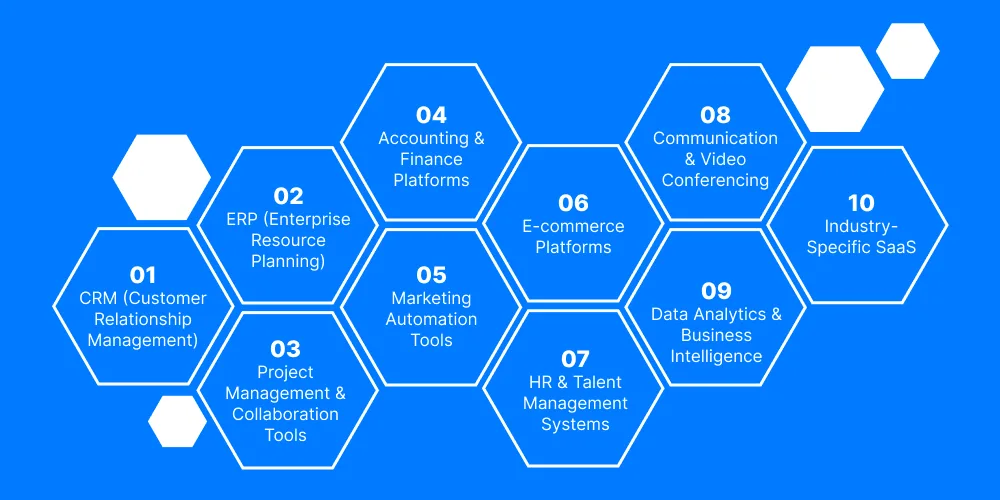
From internal tools to customer-facing platforms, SaaS applications have become the go-to model for solving a wide range of business problems. Here’s a breakdown of the most common (and high-demand) types:
ERP (Enterprise Resource Planning): Integrates core business functions like finance, HR, supply chain into one system. Often used by growing mid-size and enterprise-level companies. Example: NetSuite.
Project Management & Collaboration Tools: Supports task tracking, file sharing, and real-time team communication. Essential for remote and hybrid teams. Examples: Asana, Trello, Notion, ClickUp.
Accounting & Finance Platforms: Automates bookkeeping, invoicing, tax filing, and payroll. Popular among startups and SMEs. Examples: QuickBooks, Xero, FreshBooks.
Marketing Automation Tools: Handles everything from email campaigns and social media scheduling to lead scoring and analytics. Examples: Mailchimp, ActiveCampaign.
E-commerce Platforms: SaaS is the backbone of many online stores, powering everything from storefronts to inventory and order management. Examples: Shopify, BigCommerce.
Communication & Video Conferencing: Critical in the era of remote work enables seamless meetings, chats, and virtual collaboration. Examples: Zoom, Slack, Microsoft Teams.
Data Analytics & Business Intelligence: Provides real-time insights and data visualization to drive decision-making. Examples: Looker, Tableau, Power BI.
Industry-Specific SaaS: Tailored to niche needs like legal case management, healthcare EMR, or construction project tracking. These offer deep specialization where general tools fall short.
Want to Build a Scalable SaaS Product?
Discover expert-backed solutions to develop, launch, and scale a high-performing SaaS application from scratch, tailored to your business goals.
Why SaaS Application Development Is a Strategic Move Today
What was once considered a tech trend is now a strategic pillar for organizations across industries. From streamlining operations to unlocking new revenue streams, SaaS application development offers a level of flexibility, scalability, and speed that traditional software simply can’t match.
Market dynamics support this shift. According to Gartner, global SaaS revenue is projected to surpass $232 billion by 2025. Businesses are actively moving away from one-time licensing models in favor of subscription-based services that offer continuous value, lower upfront costs, and easier updates. The rise of remote work has only accelerated this trend.
More importantly, SaaS enables faster iteration and feedback cycles. Instead of releasing static software and waiting months for user input, SaaS platforms evolve in real-time.
From a financial lens, SaaS businesses are also far more attractive to investors. Recurring revenue, higher customer lifetime value, and predictable cash flow models all contribute to better valuations and long-term stability.
How Do You Start a SaaS From Scratch?
Learn the proven framework to transform your idea into a revenue-driving SaaS product with real market traction.
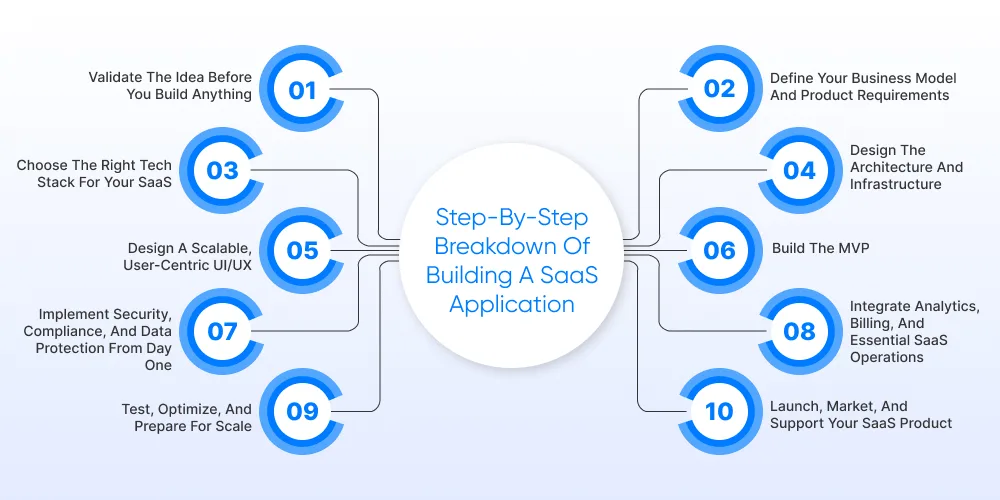
Step-by-Step Breakdown of Building a SaaS Application
Here’s a structured walkthrough of each phase involved in developing a SaaS application so you can make informed decisions at every step.
Step 1: Validate the Idea Before You Build Anything
You might think the idea is solid. Maybe it is. But before investing time, money, or an entire dev team, you need proof that real users actually want this. Idea validation helps you confirm that your solution addresses a clear, unmet need and that the market is willing to pay for it.
Start with a real problem
If you’re solving something vague, you’ll get vague results. Talk to potential users. What’s slowing them down? What are they currently doing to work around it? What are they already paying for?
Ask what they’ve tried, what failed, and what they wish existed.
Assess the competitive landscape
Validation also means understanding who’s already in the space. Look closely:
What solutions are your target users already paying for?
Where are those tools falling short?
Can you outperform on usability, speed, pricing, integrations, or support?
Test the demand
You don’t need a full build to test market interest. A landing page with a focused value proposition, a product teaser, or even a clickable prototype can help gauge early demand.
Look for intent signals:
Email signups or demo requests
Positive feedback from discovery calls
Willingness to commit to a beta or pilot
Step 2: Define Your Business Model and Product Requirements
Once your idea is validated, the next step is to clarify how it will work as a product and as a business. This is where vision turns into structure. You’re not just building features; you’re designing how the product delivers value, scales, and generates revenue.
Choose a business model that supports long-term growth
Your pricing model directly impacts adoption, churn, and scalability. Consider:
Subscription-based
Freemium
Pay-as-you-go
Tiered pricing
Your model should align with how your customers measure value. If you’re solving a business-critical problem, don’t underprice it. If you’re replacing a manual task, make it frictionless to adopt.
Map out your core product requirements
Start with what’s essential, not everything the platform could do, but what it must do to solve the primary problem and deliver a clear outcome.
Break it down into:
Core features: The minimum required for launch (MVP).
User roles and permissions: Who uses the system, and how?
Workflows and integrations: What actions should be automated? What tools does your platform need to connect with?
This is also the right time to define non-functional requirements:
Security and compliance needs
Performance expectations
Scalability targets
Step 3: Choose the Right Tech Stack for Your SaaS
The right stack sets the foundation for performance, scalability, and how quickly your team can update the software. The wrong one? It creates friction, slows velocity, and inflates cost over time.
This step is about aligning technical choices with business goals.
Frontend
Your frontend defines how users experience the product. It needs to be responsive, fast, and easy to iterate on.
Popular choices:
React: Widely adopted, backed by strong ecosystem and community
Vue: Lightweight, developer-friendly, easier for smaller teams
Angular: Powerful, but heavier; suits enterprise-grade apps
Backend
Your backend handles logic, security, and data processing.
Popular choices:
Node.js: Great for real-time apps, fast development
Python (Django/FastAPI): Clean, readable, ideal for MVPs and AI-heavy workflows
Ruby on Rails: Still a strong option for fast iterations
Java/.NET: Solid for enterprise-grade performance and integrations
Database
Your database should handle current needs but scale as usage grows.
PostgreSQL: Reliable, versatile, ideal for structured data
MongoDB: Flexible for unstructured or evolving schemas
Redis: Great as a caching layer
Cloud & DevOps
Go cloud-native from the start. Use platforms that allow for automation, CI/CD pipelines, and seamless deployment.
AWS, Azure, or Google Cloud: All viable. Choose based on team experience, pricing, or partner ecosystem.
Docker + Kubernetes: For containerization and orchestration, especially in multi-tenant environments.
Step 4: Design the Architecture and Infrastructure
Strong SaaS architecture is about how well it performs under pressure, scales with demand, and stays manageable as your team and user base grow.
This step is about future-proofing the foundation.
Start with multi-tenancy
For most SaaS businesses, multi-tenant architecture is the smart move. It allows you to serve multiple customers from a single codebase and infrastructure. This helps reduce costs and simplifies updates.
But it needs to be designed with guardrails:
Strict data isolation to prevent leakage between tenants
Logical separation of users, roles, and permissions
Smart use of schema design or tenant-aware services
If you’re building for high-security industries (e.g., healthcare, finance), single-tenant or hybrid approaches might be required.
Don’t aim for a monolith if you expect your product to evolve. Instead:
Break down services by responsibility (authentication, billing, notifications, etc.)
Use APIs to separate layers cleanly
Plan for independent scaling of core services
This makes your architecture more agile and reduces the risk of one failure cascading into others.
Set up infrastructure that supports speed and scale
Avoid locking yourself into rigid or self-hosted environments unless compliance demands it.
Key considerations:
Auto-scaling: To handle usage spikes without manual intervention
Load balancing: To distribute traffic and prevent bottlenecks
Monitoring & logging: Real-time visibility into system health (e.g., Datadog, Prometheus, Grafana)
Step 5: Design a Scalable, User-Centric UI/UX
For SaaS, UX directly impacts onboarding, product stickiness, and ultimately, customer lifetime value. This step is where product strategy meets human behavior.
Focus on the first-time experience. Most users won’t give you a second chance. If your platform isn’t intuitive on first use, you lose them.
Design for:
Clarity: Keep navigation simple and actions obvious
Guidance: Use tooltips, walkthroughs, and contextual hints
Speed: Eliminate friction between signup and first success
A great onboarding experience increases trial-to-paid conversion rates without touching your pricing. As your product evolves, so will its complexity. Plan UI components that can expand without becoming bloated.
Build reusable components for consistency
Leave room in layouts for future features
Think mobile-first if your users work on the go
If users start feeling overwhelmed, they disengage. A scalable design keeps things clean, even as your product grows.
Step 6: Build the MVP
This is where planning turns into execution. Your MVP (Minimum Viable Product) should be just that: viable, not watered down. It must solve a real problem clearly enough that users see value and fast enough that you get feedback while it still matters.
Stay focused on the primary outcome: Don’t fall into the “let’s add one more feature” trap. Strip it down to what matters:
What’s the core job the product must do?
What’s the one thing users should accomplish within their first session?
Which features support that outcome and which ones can wait?
Build around that. Once the MVP is in users’ hands, your job shifts to observation and learning. Watch how users interact, where they hesitate, and what they try to do but can’t.
That feedback loop is where real product development begins.
Step 7: Implement Security, Compliance, and Data Protection from Day One
If your SaaS handles user data, payments, or anything business-critical (which it probably does), security needs to be built in from day one. Neglecting this early can cost you customer trust, legal exposure, or worse. Every SaaS product should implement a baseline level of protection.
Encryption in transit and at rest
Role-based access control (RBAC) for sensitive actions
Rate limiting and input validation to prevent abuse and injection attacks
Know your compliance obligations
Depending on your industry or audience, you may need to comply with regulations like:
GDPR (for users in the EU)
HIPAA (for healthcare-related data)
SOC 2 / ISO 27001 (for enterprise-grade security assurances)
Step 8: Integrate Analytics, Billing, and Essential SaaS Operations
Once the product is functional and secure, the next step is making it operationally viable. That means knowing how users interact with it, getting paid reliably, and managing day-to-day workflows without manual chaos.
Use tools like Mixpanel, Amplitude, or PostHog to track:
Feature usage (what's sticky, what's ignored)
User drop-off points in onboarding or workflows
Conversion rates from free to paid
Step 9: Test, Optimize, and Prepare for Scale
By now, your SaaS product is functional, secure, and operational. But before you invite a larger audience, it needs to be pressure-tested. This phase ensures your product is working well under real conditions.
Run thorough testing across every layer. Prioritize:
Functional testing: Does each feature behave as expected?
Integration testing: Are your third-party tools and APIs reliable under load?
Performance testing: How does the app behave with 100, 1,000, or 10,000 users?
Security testing: Penetration tests, vulnerability scans, and permission audits
Automate wherever possible, but don’t skip manual testing especially for workflows that matter most to users.
Step 10: Launch, Market, and Support Your SaaS Product
Building the product is one thing. Launching it and keeping customers around is a whole different game. This step is where product turns into traction.
Start with a soft launch or private beta
Instead of blasting your launch across every channel, start small.
Invite early adopters, trusted partners, or target customers to use the product under real conditions.
Why? You get honest feedback before things go public and catch edge cases and performance issues. This can help product launch to market with clarity and momentum.
Not Sure Where to Start With SaaS?
Get step-by-step direction on everything—from validation to deployment—for a successful SaaS application launch.
Key SaaS Features Every Scalable Product Should Include
Features truly define the user experience are the building blocks of a successful SaaS product.
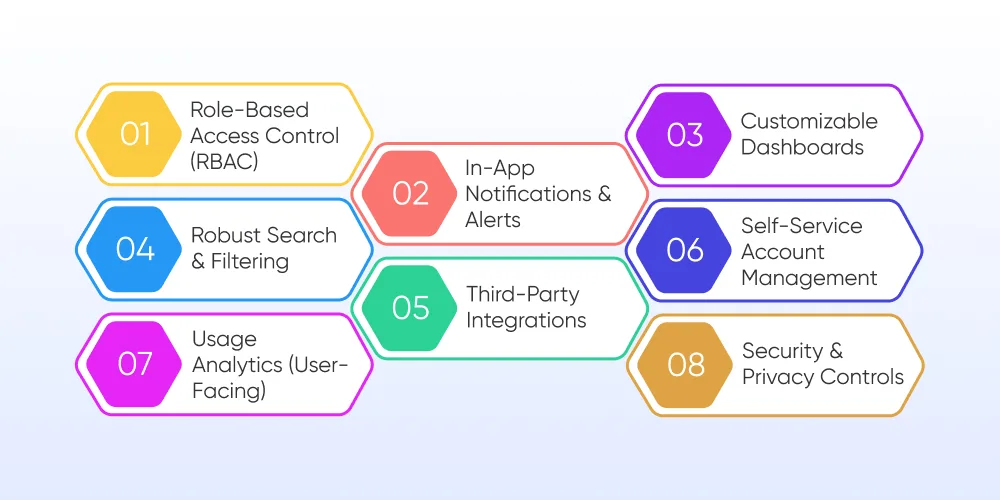
1. Role-Based Access Control (RBAC): Not every user needs access to everything. Define user roles and permissions early to:
Protect sensitive data
Simplify the UI for different user types
Support team-based collaboration securely
2. In-App Notifications & Alerts: Whether it’s a system update, invoice reminder, or collaborative action, users need to know what’s happening when it matters. Real-time alerts improve engagement and reduce drop-off.
3. Customizable Dashboards: Different users care about different metrics. Give them the power to personalize views and track what matters most without relying on dev support.
4. Robust Search & Filtering: As your app scales, users need to find information fast. Invest in powerful, intuitive search capabilities.
5. Third-Party Integrations: Whether it's Slack, Stripe, or Salesforce, users expect your app to play nicely with their existing tools. Well-documented APIs and native integrations expand your utility (and market reach).
6. Self-Service Account Management: Let users handle billing, subscription upgrades, team invites, and data exports without needing to contact support.
7. Usage Analytics (User-Facing): People like to see their own progress. Offering dashboards that show usage trends, engagement stats, or ROI can drive deeper engagement especially in B2B SaaS.
8. Security & Privacy Controls: Beyond backend protection, give users visible privacy options like data export, account deletion, activity logs. It signals transparency and trust.
Conclusion
SaaS builds businesses that are agile, scalable, and future-ready. From defining the right product vision to launching a secure, high-performing application, every decision along the way impacts how well your SaaS product performs in a competitive market.
You don’t need to get it all perfect from day one. But you do need a team that understands the nuances of how to balance speed with stability, innovation with reliability, and features with simplicity.
That’s where Ditstek Innovations (DITS) comes in.
We help product-driven businesses and startups turn ideas into functional, scalable SaaS platforms. Whether you need a ground-up build, modern architecture, or an offshore development team that can actually keep up, we’re ready to plug in where it counts. We have experience across domains like healthcare, manufacturing, finance, and logistics.
If you're planning to build a SaaS product or rethinking one that’s underperforming let’s talk. We’ll help you move from idea to impact, faster.
Frequently asked questions
It depends on the complexity of your product. A basic MVP can take anywhere from 10–16 weeks. A full-featured SaaS platform may need 6–12 months, including testing and deployment. Clear requirements and the right tech partner can significantly speed things up.
Dinesh Thakur
25+ years of IT software development experience in different domains like Business Automation, Healthcare, Retail, Workflow automation, Transportation and logistics, Compliance, Risk Mitigation, POS, etc. Hands-on experience in dealing with overseas clients and providing them with an apt solution to their business needs.